Short write-ups of each GitHub project: what happened, what I found, and what I took away from it.
Malware Incident Response · Fall 2026Why a Defender Alert Isn't a Resolved Incident
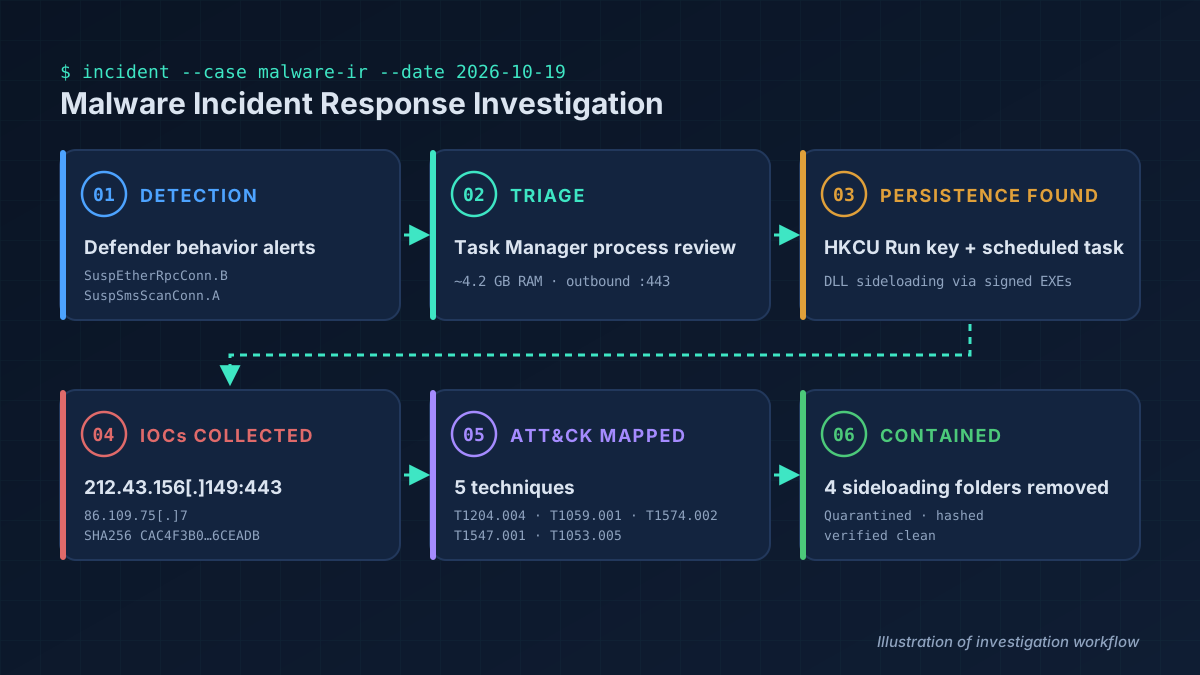
While reviewing Task Manager on my own Windows PC, I noticed an unfamiliar process, ON1Photoshop.exe, using about 4.2 GB of RAM with an outbound connection on port 443. It ran from a folder named to look like AppData\Local but missing the backslash. A second program, SWGVC.exe, sat in a similar look-alike folder.
Both used DLL sideloading: a legitimate-looking, and in one case validly signed, executable loading DLLs placed next to it in a user-writable folder. Each was set to start through both an HKCU Run value and a scheduled task. Microsoft Defender had flagged both programs on October 7, yet they kept running and starting at logon for 12 more days.
The investigation and containment commands were carried out with the help of an AI assistant, and I reviewed the findings at each step and approved each containment action before it ran. Containment stopped the processes, quarantined the files, removed the persistence, and recorded SHA256 hashes. A follow-up on October 21 found two more sideloading folders, which were removed, and pointed to a ClickFix fake-captcha command as the likely way in.
The main lesson: an antivirus alert is not the same as a resolved incident. Check that persistence is actually gone, and follow up.
Read the Full Case StudySOC Incident Response PlaybookWriting SOC Playbooks Around Eight Phases
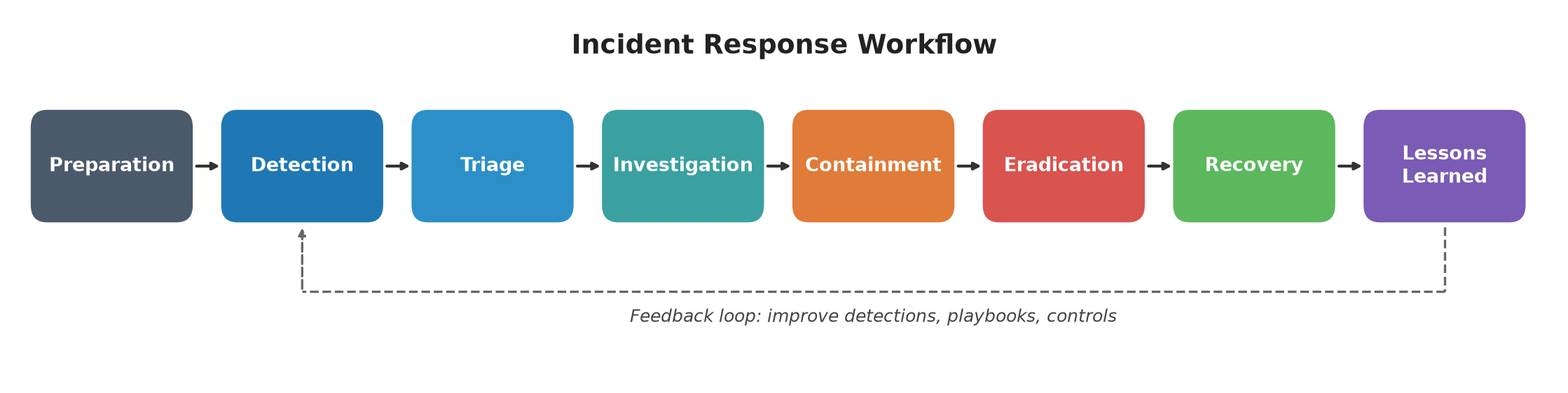
I wrote original playbooks for five common alert types: phishing, malware, brute force, ransomware, and suspicious logins. Each one walks through the same eight phases (Preparation, Detection, Triage, Investigation, Containment, Eradication, Recovery, and Lessons Learned), so an analyst can pick up any alert and know what to do next.
NIST SP 800-61 groups incident handling into four phases. I split them into smaller operational steps so each step maps to concrete analyst actions. Triage starts by recording standard fields (host, user, IP, process, hash, severity, and time), and each playbook ends with escalation criteria and a MITRE ATT&CK mapping.
Lessons Learned feeds back into Detection, for example with a new SIEM rule, an EDR policy update, or new IOCs on the blocklist. The malware playbook includes a real applied example from my own incident.
Read the Full Case StudyInternal Security Audit · SimulatedAuditing Botium Toys: Finding the Gaps
This is a simulated internal audit of Botium Toys, a fictional company from a Google Cybersecurity Certificate scenario. I reviewed the audit scope and risk assessment, evaluated administrative, technical, and physical controls, and checked them against compliance considerations.
The overall risk level came out High. Key gaps were missing least privilege and separation of duties, unencrypted sensitive data, inadequate backups with no disaster recovery plan, weak password controls with no central password manager, no intrusion detection system, and inconsistent maintenance of legacy systems. Existing strengths included a firewall, antivirus, locks, CCTV, and fire controls.
My top recommendations, in priority order: least privilege and RBAC, encryption at rest and in transit, regular backups and a disaster recovery plan, stronger password and authentication controls, intrusion detection, and a patching schedule for legacy systems.
Read the Full Case StudyDNS & ICMP Traffic Analysis · Google Cybersecurity Certificate labWhen DNS Fails, Everything Fails
In this lab scenario, customers could not load a client's website and saw a "destination port unreachable" error. The analyst in the scenario captured traffic with tcpdump, and I analyzed the provided log and wrote the incident report.
The client computer at 192.51.100.15 (address as given in the lab capture) sent a DNS A-record query over UDP to 203.0.113.2 on port 53 three times, two minutes apart. Every attempt came back with an ICMP error: "udp port 53 unreachable." The server host was reachable, but the DNS service on it was not, so the name never resolved and the browser never sent HTTPS traffic.
Likely causes were a DoS attack on the DNS server or a firewall rule blocking port 53. One more takeaway: the report template asked about an "ICMP echo reply," but the packets were really ICMP Port Unreachable messages, so it pays to check what the traffic actually says.
Read the Full Case StudySYN Flood Attack Analysis · Google Cybersecurity Certificate labSpotting a SYN Flood in a Wireshark Log
In this lab scenario, a travel agency's website was showing connection timeouts. I analyzed the provided Wireshark TCP/HTTP log and wrote the incident report.
One IP, 203.0.113.0 (address as given in the lab capture), accounted for 140 of the 173 packets in the log, and 139 of those were SYN requests. Before the flood took hold, normal visitors completed the three-way handshake and got HTTP 200 OK. Then the errors started: [RST, ACK] responses and an HTTP 504 Gateway Time-out for real visitors. After about 20.8 seconds the server stopped responding entirely, and the rest of the log is attacker SYNs. Since it came from a single IP, this points to a DoS rather than a DDoS attack.
Blocking the IP is only a short-term fix, because attackers can spoof addresses. Layered defenses help more: a firewall or IPS to drop SYN floods, rate limiting, and SYN cookies on the server.
Read the Full Case StudyWebsite Redirect Malware Analysis · Google Cybersecurity Certificate labFollowing a Redirect Through a tcpdump Log
In this lab scenario, visitors to a recipe website were prompted to download a file, and their computers slowed down after they ran it. The analyst in the scenario reproduced the problem in a sandbox and captured the traffic with tcpdump. I analyzed the provided log and wrote the incident report.
The log shows the machine look up yummyrecipesforme.com, complete the TCP handshake on port 80, and send an HTTP GET. About two minutes later, with no new site typed in, it looks up a lookalike domain, greatrecipesforme.com, and connects to it over HTTP. Every line comes from the same machine. Only the source port changes with each new connection. HTTP was the protocol involved, since it delivered both the malicious file and the redirect.
The log alone can't prove a redirect, so the context matters: the timing, the lookalike name, and the JavaScript the attacker added to the site's source code. The attacker got in by brute forcing an admin account that still used its default password, so my recommendation is a password policy that bans default passwords and locks the account after repeated failed logins.
Read the Full Case Study