Malware Incident Response Investigation.
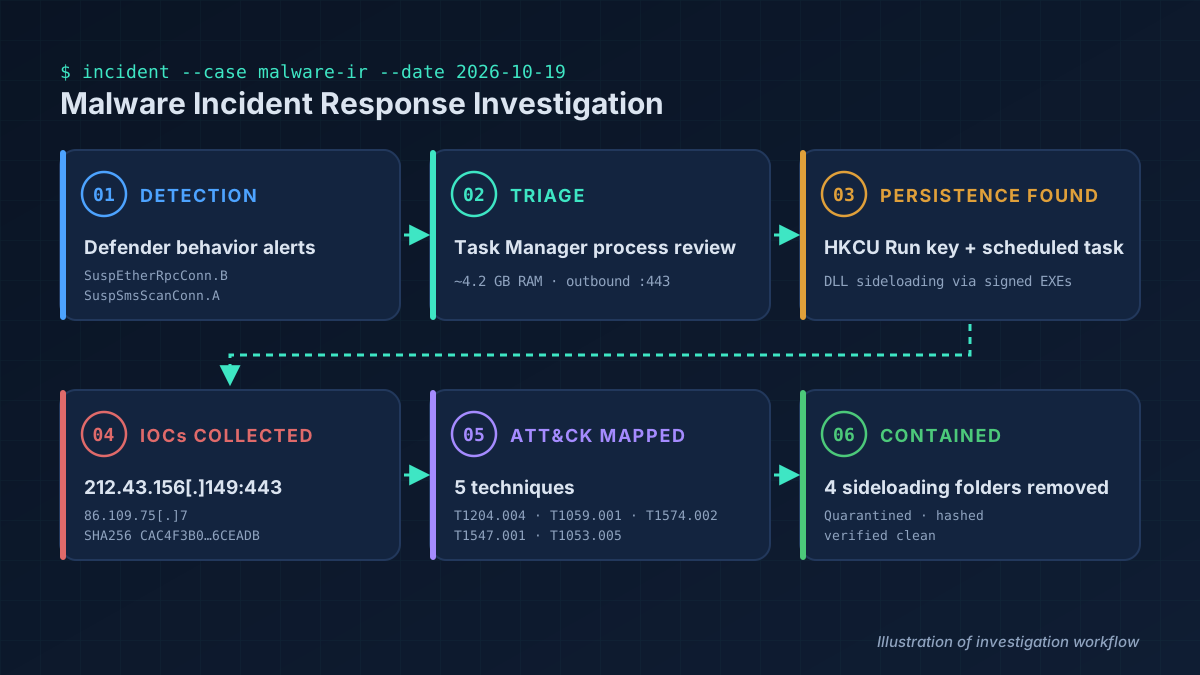
While reviewing Task Manager, I noticed an unfamiliar process using ~4.2 GB of RAM with an outbound connection on port 443. It turned out to be DLL-sideloaded malware with two persistence mechanisms, and a reminder that an antivirus alert is not the same as a resolved incident.
Scenario & My Role
Scenario
A personal Windows gaming PC (single user, home network) running Microsoft Defender. ON1Photoshop.exe and SWGVC.exe were running from folders made to look like AppData\Local. Defender had raised behavior alerts on Oct 7, but both programs kept running and auto-starting for 12 more days.
My role
I spotted the suspicious process myself. The investigation and containment commands were carried out with the help of an AI assistant; I reviewed the findings at each step and approved every containment action before it ran.
Tools
- Task Manager
- Microsoft Defender detection history
- Windows command-line queries
- Authenticode signature checks
- Registry Run keys
- Scheduled Tasks
- SHA256 hashing
- MITRE ATT&CK
Follow-up checks also covered services, WMI subscriptions, IFEO, Winlogon, AppInit_DLLs, Startup folders, and RunMRU.
Investigation Steps
- DetectAbnormal memory use (~4.2 GB) and an outbound connection to 212.43.156[.]149:443 from a photo-editing-named process I hadn't installed.
- Check the path
AppData\Localrazerlocalpro: a missing backslash, so it's a separate look-alike folder, not AppData\Local. - Identify techniqueSigned SWGVC.exe (valid SonicWall cert) next to ~22 DLLs; ON1Photoshop.exe next to ~26 DLLs: DLL sideloading.
- Find persistenceEach program had both an HKCU Run value and a scheduled task.
- Review Defender historyBehavior alerts on Oct 7 marked as executed, yet persistence was never removed.
- Contain (Oct 19)Stopped processes, moved folders to quarantine, renamed .exe/.dll to .quarantined, collected SHA256 hashes, removed Run values, disabled tasks.
- Follow up (Oct 21)Found two more sideloading folders (Stardock, LocalLogiProUpdater), removed them, deleted the disabled tasks, and traced likely initial access to a ClickFix fake-captcha command pasted into Win+R.
- VerifyRun keys, tasks, services, WMI, IFEO, Winlogon checked clean; no connection to the initial-access host; no NetSupport RAT found.
Evidence
Findings & IOCs (defanged)
| Type | Indicator | Notes |
|---|---|---|
| IP:Port | 212.43.156[.]149:443 | Outbound connection from ON1Photoshop.exe |
| IP | 86.109.75[.]7 | Likely initial-access host (written as decimal 1450003207 in the ClickFix command) |
| SHA256 | CAC4F3B0…6CEADB | SWGVC.exe (validly signed, SonicWall Inc.) – full hash in report |
| Folder | AppData\Localrazerlocalpro | ON1Photoshop.exe + ~26 DLLs |
| Folder | AppData\LocalRazerUploadProfile\sw | SWGVC.exe + ~22 DLLs |
| Folder | AppData\Local\Programs\Stardock Smart DeElevation Tool | Signed DeElevate64.exe + planted DLLs; active Run key & task |
| Folder | AppData\LocalLogiProUpdater | Signed SyncoveryCL.exe + planted DLLs; dormant |
| Run key / Task | SonicWall Virtual Network Manager · ON1 Graph Builder | Persistence for both programs |
| Detections | Yomal, Malgent, DLLHijack.DAB, Kepavll, ClickFix, SuspEtherRpcConn.B, SuspSmsScanConn.A | Defender names recorded |
MITRE ATT&CK Mapping
T1204.004Malicious Copy and PasteClickFix command pasted into Win+RT1059.001PowerShell-ExecutionPolicy Bypass, irm to %TEMP%\12.ps1T1574.002DLL Side-LoadingSigned EXEs loading planted DLLsT1547.001Registry Run KeysHKCU Run valuesT1053.005Scheduled TaskMatching logon tasksTimeline
- Sep 26Payload files created in Stardock folder
- Late SepLikely initial access: ClickFix command in Win+R
- Oct 5SWGVC.exe created
- Oct 7Defender behavior alerts on both programs
- Oct 7–19Programs keep running and auto-starting
- Oct 19Detected in Task Manager; contained
- Oct 21Follow-up: 2 more folders removed; verified clean
What I Learned
- A valid signature doesn't equal trust: the DLLs a signed EXE loads are what matter.
- Behavior alerts need follow-up: Defender detected both programs, but they ran 12 more days because persistence stayed.
- Check every autostart: each program had two, and removing one would have left the machine infected.
- Look closely at paths: one missing backslash was the clearest sign the folders were fake.
- Quarantining one DLL isn't removal: remove the loader, payloads, and persistence together, then verify.